|
Now you have a
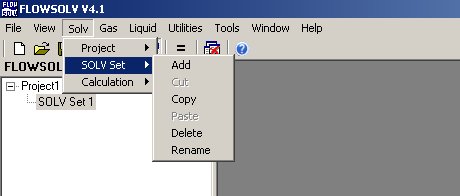
project you can begin your first "SOLV Set". This is where your
calculations will be stored. The user can have as many "Solv Sets" as
required for easy navigation of calculations.
Click "Solv"
from the menu bar the select "Solv Set" from here you can Add, Copy,
Delete, and Rename "Solv Set". The user can also edit the "Solv
set" with a "right mouse click" on the "Solv set" in the explorer
window.
|
